





Explore Line Symmetry
Grades: 4, 5
Exploring Line Symmetry
In this lesson, students will create original artwork and manipulate images to demonstrate understanding of line symmetry.
Engage
Start by asking students if they can tell you what "symmetry" means. Then, share some examples of real-world objects that are symmetrical. To help students grasp the concept of symmetry, read and share Loreen Leedy's great book, Seeing Symmetry, with your students.
Wixie includes many templates for students to explore line symmetry. Use these ideas to give students an opportunity to practice and apply their skills.
Create
Activity 1: Symmetry in the World Around Us
Ask each student to capture a picture of a symmetrical object, add it to a Wixie project, and glue it to the page. Then, have students use the paint brush to draw the line, or lines, of symmetry on the image. You could also have each student get started with the Line Symmetry template.
Activity 2: Painting Symmetrical Objects
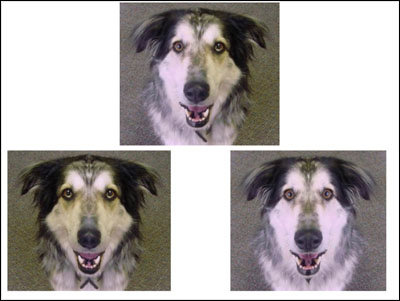
Though our faces exhibit symmetry, they are not perfectly symmetrical. Ask students to capture an image of their face to show how one side of their face is slightly different from the other, and then have them glue the image to the paint layer.
Students can use the rectangle selection tool to select their entire face and duplicate it so that there are three versions of their image. An original, as well as two others.
Then, once students have three images, have them use the rectangle selection tool again to select the right or left side of their face. Duplicate the selection, flip it on a vertical axis, and move it over the other half of their face.
When students repeat this process for the other side of their face, they will see how different each side of their face really is.
Activity 3: Painting Symmetrical Objects
Butterflies are common symmetrical objects. Challenge students to think symmetrically and draw a butterfly using the Symmetry options for the paint brush tool.
Have students choose the Paint brush tool and check the Mirror box on the Editing panel. Starting in the middle of the canvas, have them paint one wing; the other wing will paint at the same time. Remind them to click the Undo button if they need to try again.
Share
Use the Project Wizard to combine students' artwork into a class book to celebrate how symmetry can be used in art. Share the combined project URL on your website or export it as a PDF to share with families and the community.