
Using Wixie as your teacher design tool
With Wixie, it’s easy to get your classroom ready for back-to-school. From posters to classroom design, to seating charts and more, your work in Wixie can help inspire and welcome students for a fun year back at school.
Personalized stationery and invitations
Use the Wixie design tools to create your own unique classroom stationery and invitations. This provides an opportunity to share with students the art of writing thank you notes or letters. The letterhead can also be used to ask for donations for field day or other events and the invitations for fun school events like back-to-school night, class parties and more.
Browse the Stationery or Invitation folders for some inspiration. Then, start your own blank page and search for images in the Stickers library.
Classroom newsletters
Classroom calendar
Create the perfect calendar for you and your students to keep track of important dates and events.
Classroom website
Start with this background to make your own classroom page in Wixie. Simply adjust the background to match your needs. Use the Image button to add details. Select each object to add a hyperlink to more information and resources.
Certificates
Create customs certificates for your students this year in Wixie. Browse the Certificate folder or search “certificate” on your home page to find a variety of options to celebrate your students’ achievement.
Posters
Use the tools in Wixie to make your classroom colorful and fun. This is a great way to model risk taking, as well as craftsmanship. It is also a great time to show your students that you also know how to use Wixie!
Seating chart
You can use the Seating Chart template to set up a seating chart for your classroom. Each of the student desks and names are separate items. To rearrange, simply select and move both items.
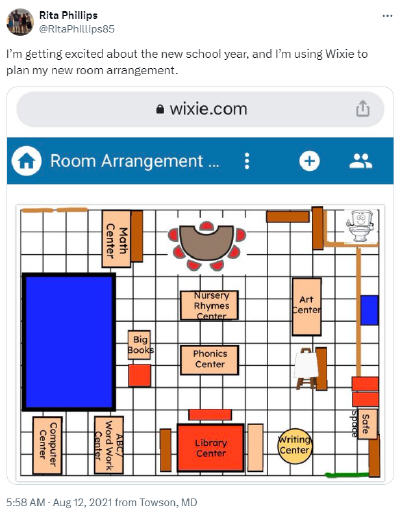
Plan your room
Looking to take it a step further and rearrange your classroom this school year? Start with a blank canvas or use a grid template to design the perfect learning environment for you and your students.
Showcase gallery
Use the gallery walk template to showcase high quality student work. Simply use the Project Wizard book option in your Showcase folder to create a project with student work added as web objects. This way, viewers can select a web object to view the entire project “on display.”
Book trailers
Get students excited about the books you will be reading this year with a book trailer introductory video. Use one of the video templates or let your design skills go wild by starting with a blank canvas.
After you have inspired your students, challenge them to create their own book trailers to entice others to read their favorite books.
With these tools and ideas, you can use Wixie to create an engaging and welcoming classroom environment that fosters creativity and excitement for learning.
 Effective Integration
 Instructional Design
 Learning Strategies
 Literacy
 Month-by-Month
 Product Ideas
 STEM/STEAM
 Share and Showcase
 Updates
 User Management