
Wixie shows notifications on the toolbar to help you better manage student work.
Wixie shows notifications on the toolbar to help you better manage student work.
Click the notification icon on the toolbar if it has a number on it. This indicates you have new notifications.

Notifications appear when students:
- start or complete an assignment,
- reply to comment, or
- start a team project.
Read the notifications for a summary of student activity.
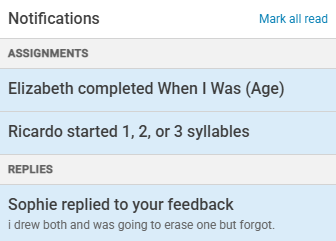
Select a specific notification to move to that location in the tools to quickly give additional feedback and track student progress.
This is an easy way to quickly respond to student questions in the feedback panel.