
You can make a copy of someone else's project if they share the URL.
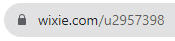
If a colleague or another Wixie user has shared the URL to a project or activity they have created, click the URL to view it.
If you are not logged in already, use the Log in button to sign in to your Wixie account.

Click the File menu and choose Make a Copy.
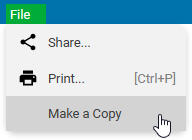
The project will be added to your My Projects folder.
You can now edit the file and assign it to your students.
Note: This is a great way to share projects and activities you have created in Wixie. Simply share the URL via email or social media. Other users can then follow this process to make a copy in their own Wixie accounts.