
You can demo a project assigned to students. No changes are saved to projects opened in demo mode.
Click the Home button on the toolbar.

You will see a list of your projects.
Click the menu button for the project.
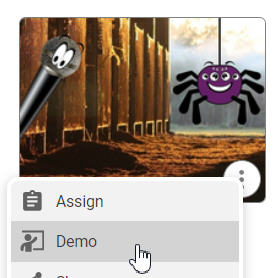
Click Demo in the menu that appears.
The project will open.
You can make changes to the project, but they will not be saved.
You will see a list of your projects.
Click the menu button for the project.
Click Demo in the menu that appears.
The project will open.
You can make changes to the project, but they will not be saved.