
You can erase part of a painting using the Eraser tool.
Click the Eraser tool on the tool palette.

You will see the Eraser options panel.
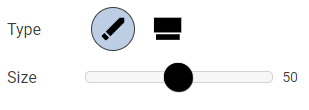
Click an eraser type.
Use the Size slider to change the size of the eraser.
Click and drag on the page to erase.
You will see the Eraser options panel.
Click an eraser type.
Use the Size slider to change the size of the eraser.
Click and drag on the page to erase.