
Combine Wixie and a BenQ board for powerful blended learning
Tech4Learning is pleased to announce a new Wixie partnership with BenQ, which engineers interactive and smart displays with features designed specifically for classrooms. Using Wixie and a BenQ board together make it easy to get all students actively participating in lessons.
Take advantage of thousands of interactive digital assignments
Wixie's built-in libraries provide thousands of options for interactive whole-class activities on your BenQ board. Simply search at your Wixie dashboard to find the activity that matches your learning goal. For example, have students express an opinion with a survey or graph as they come into class to engage them in a topic you are exploring that day.
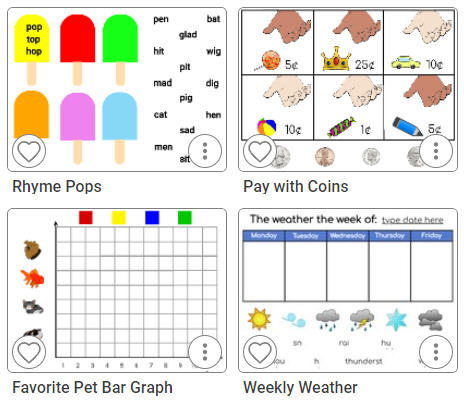
With more touch points, the board is easy to use with even your youngest learners. Combine a Wixie activity and the BenQ board during morning meeting or circle time to get students moving and involved as you review and revisit topics and concepts, like daily weather.
Share and compare individual work in Wixie
The BenQ board's InstaShare tool connects student devices to the board so you can bring up students' work in Wixie for the entire class to see, review, compare, and celebrate.
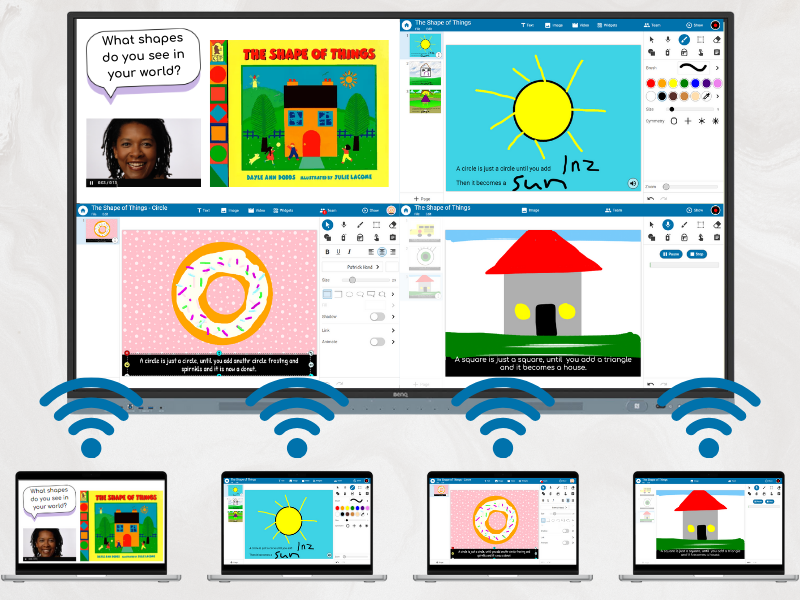
You can display up to nine student screens at one time to foster real-time collaboration and promote active participation and an exchange of ideas. Combine InstaShare with students' work in Wixie to easily see how different students solved a math problem, identified a character’s traits, responded to a prompt, and much more.
Easily capture lessons and demonstrations
Use the BenQ board's Easy Write application to capture a screen recording of your Wixie assignment demonstration. Then, simply share the recording with students who are absent or whose learning plan requires repeated directions. You can even add the final video into the Wixie file for use as a future flipped lesson or with another group of students or learners next year.
No need to attach your device — BenQ boards work differently
While you can always share your screen to the BenQ board, they are more than just an interactive screen. Add Wixie from the BenQ store to your profile, so you can simply log into your BenQ profile and use your Wixie account from any board, without needing to connect your device. Build your Wixie lessons from home on a personal device for use at school. There is no need to worry about missing cords or device breakdowns and you won’t see notifications or other distractions during a lesson to keep the focus on learning.
Wixie and BenQ for the win!
 Effective Integration
 Instructional Design
 Learning Strategies
 Literacy
 Month-by-Month
 Product Ideas
 STEM/STEAM
 Share and Showcase
 Updates
 User Management